
4 Tabular data (e.g. CSV)
Context: This was written as accompanying material for the MDG Library Carpentry workshop 2026 in Birmingham.
Whilst you can work with tabular data in a basic text editor such as Windows’ Notepad, it is not a nice experience. Consider using a more advanced text editor. See Useful tools/setup to work with non-MARC data formats for suggestions.
Tabular data1 formats, like CSV and TSV, are plain text data formats that store tables. The table rows are separated by a newline and the columns are separated by a delimiter. The delimiter varies between formats. Using custom delimiters is also possible, though you might want to save the file as simple text file (.txt) in this case to avoid confusion.
CSV stands for Comma-Separated Values, i.e. the used column delimiter is comma ,.
TSV for Tab-Separated Values, i.e. the used column delimiter is tab ⇥.
Newline character(s)
The character(s) used for newline depend(s) on your operating system. Windows uses CRLF (carriage return and line feed2 3), while Unix and Unix-like systems (e.g. Linux or macOS) use LF (line feed) only. You may run into problems if the newline character(s) in the file(s) your working with do not conform to what your operating system is expecting.4
Text editors like Notepad++ and Visual Studio Code show you which newline character(s) are used in the file you have open and also let you change it. Look at the bottom right:


Click or right-click on the respective area let’s you change the newline character(s).
CSV
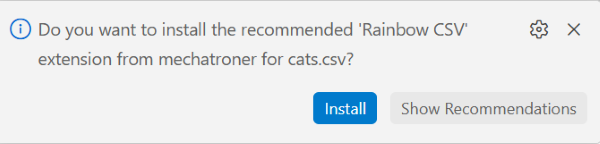
VS Code has an extension called “Rainbow CSV” that gives the values in each column a different colour and can also make the header line sticky. Very useful! It doesn’t just work for CSV but also other delimited formats and you can even set it to use a custom delimiter.
VS Code may as you if you want to install this the first time you open a CSV file in it. Just click the “Install” button.
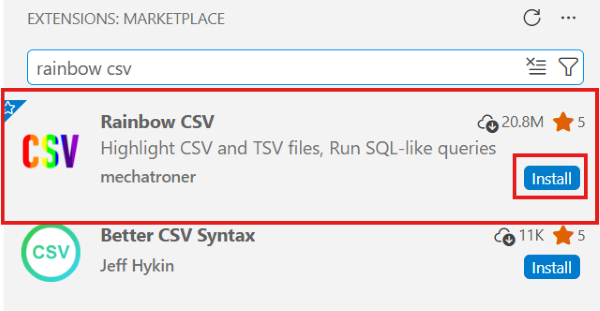
To install it otherwise click on the extensions button in the left side menu: 
Type “rainbow csv” into the search bar and click the “Install” button.
CSV basics
The first line in the CSV file we’re creating in this tutorial will be header line containing the column names. Header lines are not mandatory, it’s fine to have the data only.
ID,name,age,breed,colour
Note that there are no spaces between the delimiter (,) and the column names.
Filling in the rest of our demo data we have:
Id,name,age,breed,colour
1,Duncan,10,moggy,orange
2,Izzy,5,moggy,black
3,Trixie,8,moggy,black
4,Sushi,15,Korat,blue
5,Pippin,2,Munchkin,white

Each line, or record, should have the same number of column values (fields).
Quote and escape characters
What if one of our values contains a comma however? Let’s say Duncan is both orange and white.
Id,name,age,breed,colour
1,Duncan,10,moggy,orange, white

We now have a mismatch between columns specified in the header and columns given for the first record. The table looks something like that now:
| ID | name | age | breed | colour | |
|---|---|---|---|---|---|
| 1 | Duncan | 10 | moggy | orange | white |
To avoid this we use a so called quote character to enclose the value. The default quote characters is single quotes ('').
A text editor shouldn’t mangle those, but be careful if you for some reason work in something like Word or Google Doc. They have a habit of automatically turning "Duncan" into “Duncan”. Though they look very similar " and “ or ” are not the same character!
So let’s enclose those colours:
Id,name,age,breed,colour
1,Duncan,10,moggy,"orange, white"

| ID | name | age | breed | colour |
|---|---|---|---|---|
| 1 | Duncan | 10 | moggy | orange, white |
What if " itself is in a value that needs to be escaped?
In this case the " in the value needs to be escaped (i.e. marked) as not to be interpreted as a quote character. The default CSV dialect uses another " as the escape character, so unescaped " becomes "" when escaped.
Id,name,age,breed,colour
1,"Isambard ""Izzy"" Sooty",5,moggy,black
The quote and escape characters vary between different CSV dialects. There is no canonical definition of CSV, the de facto standard is an informational RFC (RFC 41805) and there " is the default escape character.
Because different delimiters, line terminators, quote and escape characters as well as changes in other behaviours can make sense a specification on how to express the specific dialect exists: CSV Dialect6 and e.g. the Python standard CSV parser lets you set delimiter, line terminators etc. as parameters when reading in a CSV file.
It’s fine to quote all values, irrespective of them containing the delimiter. I like this for consistency and readability.
Applying this to our demo data and adding some more fur colours in, we get:
"id","name","age","breed","colours"
"1","Duncan","10","moggy","orange, white"
"2","Izzy","5","moggy","black, white"
"3","Trixie","8","moggy","black, orange"
"4","Sushi","15","Korat","blue"
"5","Pippin","2","Munchkin","white, blue"

Advantages and disadvantages of tabular data
CSV and other tabular data formats are used a lot because they
- can be created, read and edited in any text editor as well as common spreadsheet applications,
- are human-readable,
- use a very simple schema, and
- are fast to read and write to memory as parsing them is easy.
There are some downsides as well though and depending on the structure of your data, a tabular format might be very poor choice:
- a tabular data file can hold only one table per file. There are no “sheets” as in spreadsheet applications.
- you cannot put formulas into them. They are just data and can’t hold data transformation logic.
- nested and complex data doesn’t really work with them. If you can’t easily put your data into a table, tabular data formats are not the weapon of choice.7
Annotated bibliography and further reading
Data formats in general
Some articles explaining the end of line (EOL) character problem of line feed (LF) and carriage return (CR):
-
Carriage Returns: A Comprehensive Guide to Carriage Returns, Line Breaks and CRLF (2025) Available at: https://www.joshuahumphrey.co.uk/carriage-returns/ [Accessed: 24 May 2026]
-
Meszaros, Bence (2021) ‘Understanding digital line breaks: Carriage return, line feed, newline, <br>, hard and soft breaks and all the line break mumbo-jumbo you can think of’, Medium, 14 June. Available at: https://decketts.medium.com/understanding-digital-line-breaks-5ddfaa66677b [Accessed: 24 May 2026]
This bring the HTML line break <br> into the mix as well.
-
‘Newline’ (2026) Wikipedia. Available at: https://en.wikipedia.org/wiki/Newline [Accessed: 24 May 2026]
And some randomness I looked at and found useful while putting the workshop together:
- ‘Comparison of data-serialization formats’ (2026) Wikipedia. Available at: https://en.wikipedia.org/wiki/Comparison_of_data-serialization_formats [Accessed: 24 May 2026]
Tabular data
The Wikipedia articles here to a very good job at explaining how CSV and TSV, and indeed any delimiter-separated format, work(s):
-
‘Comma-separated values’ (2026) Wikipedia. Available at: https://en.wikipedia.org/wiki/Comma-separated_values [Accessed: 24 May 2026]
-
‘Delimiter’ (2026) Wikipedia. Available at: https://en.wikipedia.org/wiki/Delimiter [Accessed: 24 May 2026]
-
‘Delimiter-separated values’ (2026) Wikipedia. Available at: https://en.wikipedia.org/wiki/Delimiter-separated_values [Accessed: 24 May 2026]
-
‘Tab-separated values’ (2026) Wikipedia. Available at: https://en.wikipedia.org/wiki/Tab-separated_values [Accessed: 24 May 2026]
-
‘Table (information)’ (2026) Wikipedia. Available at: https://en.wikipedia.org/wiki/Table_(information) [Accessed: 24 May 2026]
Both CSV and TSV have no proper standard definition. The closest each has is still extremely readable and understandable as far as standards go. These are not scary:
-
Shafranovich, Yakov (2005) RFC 4180: Common Format and MIME Type for Comma-Separated Values (CSV) Files. Available at: https://doi.org/10.17487/RFC4180 [Accessed: 24 May 2026]
The closest CSV has to a standard definition.
-
University of Minnesota Internet Gopher Team (no date) Definition of tab-separated-values (tsv). Available at: https://www.iana.org/assignments/media-types/text/tab-separated-values [Accessed: 24 May 2026]
The closest TSV has to a standard definition.
Further sources I used to compile the workshop and best practice documents for CSV:
-
CSV Format: History, Advantages and Why It Is Still Popular (no date) Available at: https://bytescout.com/blog/csv-format-history-advantages.html [Accessed: 24 May 2026]
-
Pollock, Rufus (2021) CSV Dialect. Available at: https://specs.frictionlessdata.io/csv-dialect/ [Accessed: 24 May 2026]
Defines a standard JSON-based format to specify CSV dialects.
-
Tennison, Jeni (2016) CSV on the Web: A Primer. Available at: https://www.w3.org/TR/2016/NOTE-tabular-data-primer-20160225/ [Accessed: 24 May 2026]
This is pretty techy and mostly concerned with dealing with CSVs on the web.
-
Tennison, Jeni, Kellogg, Greg and Herman, Ivan (2015) ‘Best Practice CSV’ in J. Tennison, G. Kellogg and I. Herman (eds.), Model for Tabular Data and Metadata on the Web. Available at: https://www.w3.org/TR/2015/REC-tabular-data-model-20151217/#syntax [Accessed: 24 May 2026]
This chapter is short, techy recap of CSV, the rest is way too techy for the scope of this webinar.
-
Walsh, Paul, Pollock, Rufus and Keegan, Martin (2017) Tabular Data Package. Available at: https://specs.frictionlessdata.io/tabular-data-package/ [Accessed: 24 May 2026]
Similar to “CSV Dialect”, but this time concerned with describing the data itself.
Other sources
- ‘List of longest-living cats’ (2026) Available at: https://en.wikipedia.org/wiki/List_of_longest-living_cats [Accessed: 24 May 2026]
Tools and software
Looking up code points for characters and how to represent them in various languages:
- Codepoints (no date) Available at: https://codepoints.net/ [Accessed: 24 May 2026]
Converting between all sorts of number formats:
- Number Converter (no date) Available at: https://www.rapidtables.com/convert/number/index.html [Accessed: 24 May 2026]
Text editors and extensions:
-
Ho, Don (2026) Notepad++ [Computer programme]. Available at: https://notepad-plus-plus.org/ [Accessed: 24 May 2026]
Easy entry-level text editor that is useful for working with data files.
-
Microsoft (2026) Visual Studio Code [Computer programme]. Available at: https://code.visualstudio.com/ [Accessed: 24 May 2026]
Much more than a text editor, more of a development environment. Steeper learning curve than Notepad++.
-
Microsoft (2026) Visual Studio Code (browser version) [Computer programme]. Available at: https://vscode.dev/ [Accessed: 24 May 2026]
The in-browser version of Visual Studio Code.
-
Sublime HQ (2026) Sublime Text [Computer programme]. Available at: https://www.sublimetext.com/ [Accessed: 24 May 2026]
Powerful text editor. The learning curve might be a bit steeper than Notepad++.
Notepad++ extensions:
-
BdR76 (2025) CSVLint [Computer programme]. Available at: https://github.com/BdR76/CSVLint/ [Accessed: 24 May 2026]
Makes working with CVS, other delimited files in Notepad++ easier. Recommend installing this via Notepad++ rather than downloading from GitHub, it’s easier: Plugins → Plugins Admin → Search for “CSVLint” → Tick the check box next to the name → Click “Install” (top right).
-
molsonkiko (2026) JsonToolsNppPlugin [Computer programme]. Available at: https://github.com/molsonkiko/JsonToolsNppPlugin [Accessed: 24 May 2026]
An extension/plugin to make working with JSON in Notepad++ easier. Recommend installing this via Notepad++ rather than downloading from GitHub, it’s easier: Plugins → Plugins Admin → Search for “JSON Tools” → Tick the check box next to the name → Click “Install” (top right).
-
morbac (2022) xmltools [Computer programme]. Available at: https://github.com/morbac/xmltools [Accessed: 24 May 2026]
An extension/plugin to make working with XML in Notepad++ easier. Recommend installing this via Notepad++ rather than downloading from GitHub, it’s easier: Plugins → Plugins Admin → Search for “XML Tools” → Tick the check box next to the name → Click “Install” (top right).
VS Code extensions:
-
mechatroner (2026) Rainbow CSV [Computer programme]. Available at: https://marketplace.visualstudio.com/items?itemName=mechatroner.rainbow-csv [Accessed: 24 May 2026]
A Visual Studio Code extension that makes working with delimited files a lot easier.
-
The information in this section has been, unless stated otherwise, compiled using the following sources: ‘Comma-separated values’, 2026, ‘Delimiter’, 2026], ‘Delimiter-separated values’, 2026), ‘Tab-separated values’, 2026, ‘Table (information)’, 2026, Shafranovich, Y., 2005, University of Minnesota Internet Gopher Tea, no date, Tennison, J., 2006, Tennison, J., Kellogg, G. & Herman, I., 2015, ↩
-
The function of Line Feed and Carriage Return is easier to visualise with a typewriter: To start a new line the paper needs to be moved up one line (that’s the Line Feed) and carriage (the moving part at the top) needs to return to its start position (that’s the Carriage Return). ↩
-
see Carriage Returns: A Comprehensive Guide to Carriage Returns, Line Breaks and CRLF, 2025, Meszaros, B., 2021 and ‘Newline’, 2026. ↩
-
CSV Format: History, Advantages and Why It Is Still Popular, no date ↩