
3 Useful tools/setup to work with non-MARC data formats
I have no affiliation with any of the software/services listed below. This is based on what I like to use and found accessible.
To work with files in the formats discussed, work with a text editor that can do syntax highlighting and show invisible characters such as e.g. Notepad++, Visual Studio Code, Sublime Text etc. They have a bit of a learning curve, but you’ll save yourself a lot of headache!
Notepad++ is a nice and easy one to get started with. The interface looks kind of familiar to office programmes. Plugins are available to make working with e.g. JSON and XML files easier. There are also a number of extensions to make your life easier:
- CSVLint for working with CSV and other delimited files,
- XML Tools for working with XML files, and
- JSON Tools for working with JSON files.
Visual Studio Code (VS Code) is a lot more than just a text editor, you can use this as a development environment and run code from it. It has a terminal and debugging functionality. The learning curve is a bit steeper, the interface is less familiar if you come from the usual office apps and more is done via keyboard shortcuts or commands. There are lots of extensions and plugins, you can connect it to AI etc. You get the idea: it can do a lot and thus is more complex to learn.
VS Code has built-in syntax support for JSON and XML and a useful extension for CSV and other delimited files called Rainbow CSV. See below for instructions in installation.
Visual Studio Code also has a browser version if you cannot or don’t want to install anything on your machine: https://vscode.dev/.
CSV
VS Code has an extension called “Rainbow CSV” that gives the values in each column a different colour and can also make the header line sticky. Very useful! It doesn’t just work for CSV but also other delimited formats and you can even set it to use a custom delimiter.
VS Code may as you if you want to install this the first time you open a CSV file in it. Just click the “Install” button.
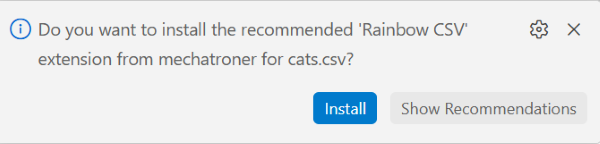
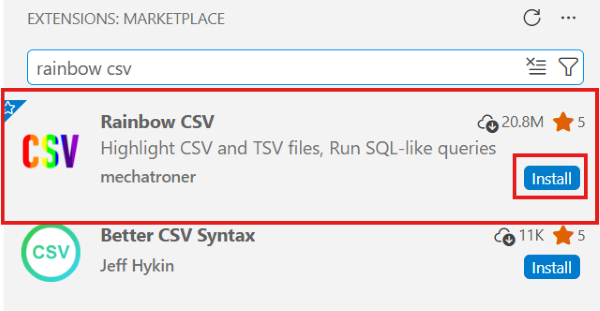
To install it otherwise click on the extensions button in the left side menu: 
Type “rainbow csv” into the search bar and click the “Install” button.
Links to software, extensions and tools
Looking up code points for characters and how to represent them in various languages:
- Codepoints (no date) Available at: https://codepoints.net/ [Accessed: 24 May 2026]
Converting between all sorts of number formats:
- Number Converter (no date) Available at: https://www.rapidtables.com/convert/number/index.html [Accessed: 24 May 2026]
Text editors and extensions:
-
Ho, Don (2026) Notepad++ [Computer programme]. Available at: https://notepad-plus-plus.org/ [Accessed: 24 May 2026]
Easy entry-level text editor that is useful for working with data files.
-
Microsoft (2026) Visual Studio Code [Computer programme]. Available at: https://code.visualstudio.com/ [Accessed: 24 May 2026]
Much more than a text editor, more of a development environment. Steeper learning curve than Notepad++.
-
Microsoft (2026) Visual Studio Code (browser version) [Computer programme]. Available at: https://vscode.dev/ [Accessed: 24 May 2026]
The in-browser version of Visual Studio Code.
-
Sublime HQ (2026) Sublime Text [Computer programme]. Available at: https://www.sublimetext.com/ [Accessed: 24 May 2026]
Powerful text editor. The learning curve might be a bit steeper than Notepad++.
Notepad++ extensions:
-
BdR76 (2025) CSVLint [Computer programme]. Available at: https://github.com/BdR76/CSVLint/ [Accessed: 24 May 2026]
Makes working with CVS, other delimited files in Notepad++ easier. Recommend installing this via Notepad++ rather than downloading from GitHub, it’s easier: Plugins → Plugins Admin → Search for “CSVLint” → Tick the check box next to the name → Click “Install” (top right).
-
molsonkiko (2026) JsonToolsNppPlugin [Computer programme]. Available at: https://github.com/molsonkiko/JsonToolsNppPlugin [Accessed: 24 May 2026]
An extension/plugin to make working with JSON in Notepad++ easier. Recommend installing this via Notepad++ rather than downloading from GitHub, it’s easier: Plugins → Plugins Admin → Search for “JSON Tools” → Tick the check box next to the name → Click “Install” (top right).
-
morbac (2022) xmltools [Computer programme]. Available at: https://github.com/morbac/xmltools [Accessed: 24 May 2026]
An extension/plugin to make working with XML in Notepad++ easier. Recommend installing this via Notepad++ rather than downloading from GitHub, it’s easier: Plugins → Plugins Admin → Search for “XML Tools” → Tick the check box next to the name → Click “Install” (top right).
VS Code extensions:
-
mechatroner (2026) Rainbow CSV [Computer programme]. Available at: https://marketplace.visualstudio.com/items?itemName=mechatroner.rainbow-csv [Accessed: 24 May 2026]
A Visual Studio Code extension that makes working with delimited files a lot easier.