5 XML
Context: This was written as accompanying material for the MDG Library Carpentry workshop 2026 in Birmingham. It is meant to be read in conjunction with XML Schema, DTD and Namespaces.
XML stands for eXtensible Markup Language. So, first what is a markup language?
Markup languages
Markup languages1 allow one to mark parts of data as a specific thing. They have their roots in typesetting and text presentation: printers or typographers would mark up which typeface, style or text size to use for each part of a text. These instructions would then be followed by the typesetter or typesetting machine to set the text for printing.
There are markup languages around today (such as e.g. HTML, LaTeX, Markdown) that do pretty much exactly that: mark something as for example a heading, or to be emphasised. That markup is somewhat disconnected from the presentation though: something is marked as a heading, but it doesn’t say anything about how that heading should look. The look is defined by so-called stylesheets. Just swap the stylesheet out and the content stays the same but may look completely different. The data is separated from the presentation.
Abstracting this a bit away from marking things for presentation and towards labelling, categorising and structuring information into elements and adding in some rules about which elements that can be, where they can occur etc. so the structure can be validated: we get XML.
XML history and use
XML2 as a standard has been around for nearly 30 years. Work on it started in 1996 and it was first published in 1998. It is maintained by the World Wide Web Consortium (W3C).
There are two versions: XML 1.03, which is in its 5th edition published in 2008 and XML 1.14 which is in its 2nd edition published in 2006. XML 1.0 is the default and what the W3C recommends to use. XML 1.1 has some additional, advanced features and should only be used if these are required5.
The main purpose of XML is serialisation, i.e. the
- storage,
- transmission, and
- reconstruction of data.
XML allows this to be done in a software- and hardware independent way.
It is designed to be both machine- and human-readable.
XML is so fundamental that a lot of data formats you are working with every day are built on it. For example Word and Excel documents (.docx, .xlsx), vector graphics (.svg), HTML, RSS, …
XML syntax
Documents conforming to the XML syntax6 are referred to as well formed.
Tags and elements
XML wraps data in tags: an opening and a closing tag. The names of the tags are not predefined, but it’s up to the author of the XML document to define tags and overall document structure. Day to day one usually works with XML documents that follow specific definitions already developed. Coming up with one’s own is less common in regular metadata work.
Opening tags names are enclosed in <> and closing tag names in </>. Every tag that’s opened must also be closed again.
<person>
    <name>Fran</name>
</person>
Some tags exist but have no content, they are called empty tags and can be opened and closed in one go:
<emptyTag/>
Tag names cannot being with -, . or a number and they cannot contain any of the following characters !"#$%&'()*+,/;<=>?@[\]^`{|}~ or a space. Otherwise one can choose whatever one wants.
Let’s try this out with our cat data:
<id>1</id>
<name>Duncan</name>
<age>10</age>
<breed>moggy</breed>
<colour>orange</colour>
<colour>white</colour>
<id>2</id>
<name>Izzy</name>
<age>5</age>
<breed>moggy</breed>
<colour>black</colour>
<id>3</id>
<name>Trixie</name>
<age>8</age>
<breed>moggy</breed>
<colour>black</colour>
<colour>orange</colour>
<id>4</id>
<name>Sushi</name>
<age>15</age>
<breed>Korat</breed>
<colour>blue</colour>
<id>5</id>
<name>Pippin</name>
<age>2</age>
<breed>Munchkin</breed>
<colour>white</colour>
<colour>blue</colour>
Mh, how do we know where the description for one cat stop and the next begins though? This needs a bit more structure!
Nesting
The content of a tag can also be other tags, not just text or numbers. This is called nesting.
So let’s wrap each of our cat description in the tag <cat> and add some indents so the nesting is visually clear as well.
<cat>
    <id>1</id>
    <name>Duncan</name>
    <age>10</age>
    <breed>moggy</breed>
    <colour>orange</colour>
    <colour>white</colour>
</cat>
<cat>
    <id>2</id>
    <name>Izzy</name>
    <age>5</age>
    <breed>moggy</breed>
    <colour>black</colour>
</cat>
<cat>
    <id>3</id>
    <name>Trixie</name>
    <age>8</age>
    <breed>moggy</breed>
    <colour>black</colour>
    <colour>orange</colour>
</cat>
<cat>
    <id>4</id>
    <name>Sushi</name>
    <age>15</age>
    <breed>Korat</breed>
    <colour>blue</colour>
</cat>
<cat>
    <id>5</id>
    <name>Pippin</name>
    <age>2</age>
    <breed>Munchkin</breed>
    <colour>white</colour>
    <colour>blue</colour>
</cat>
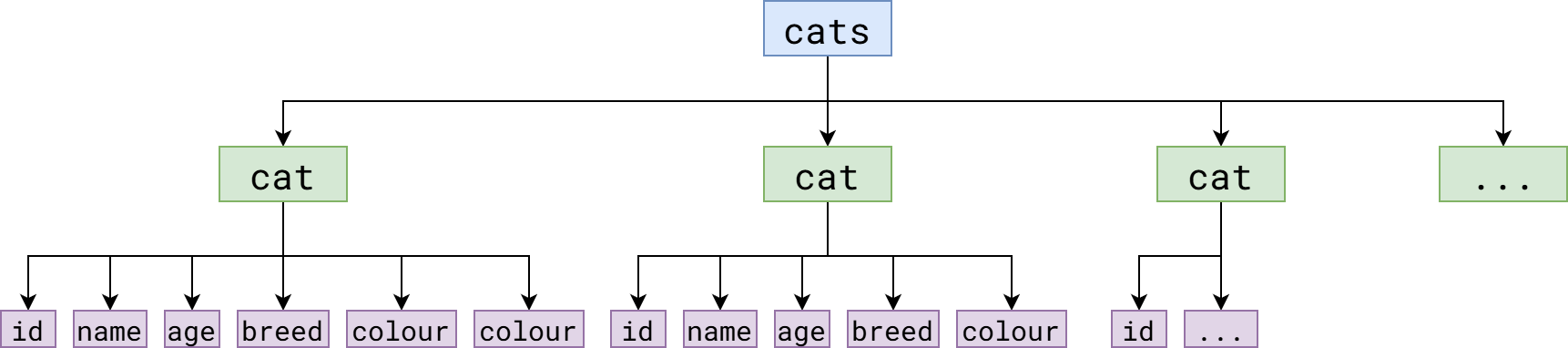
The root element and the XML tree
An XML document must have a root element that all other elements are nested/wrapped in. This is currently lacking from our example. The root element can be called anything, it’s not necessary to be called “root”. What’s important is that on the top level there can be only one element.
So, let’s wrap all out cats into a <cats> element.
<cats>
    <cat>
        <id>1</id>
        <name>Duncan</name>
        <age>10</age>
        <breed>moggy</breed>
        <colour>orange</colour>
        <colour>white</colour>
    </cat>
    <cat>
        <id>2</id>
        <name>Izzy</name>
        <age>5</age>
        <breed>moggy</breed>
        <colour>black</colour>
    </cat>
    <cat>
        <id>3</id>
        <name>Trixie</name>
        <age>8</age>
        <breed>moggy</breed>
        <colour>black</colour>
        <colour>orange</colour>
    </cat>
    <cat>
        <id>4</id>
        <name>Sushi</name>
        <age>15</age>
        <breed>Korat</breed>
        <colour>blue</colour>
    </cat>
    <cat>
        <id>5</id>
        <name>Pippin</name>
        <age>2</age>
        <breed>Munchkin</breed>
        <colour>white</colour>
        <colour>blue</colour>
    </cat>
</cats>
What we have now is a tree structure. The various elements in it have child elements, parent elements or sibling elements.
XML prolog
Just one more thing is missing before we have a well formed XML document: the XML prolog that states the XML version used and the encoding.
<?xml version="1.0" encoding="UTF-8"?>
<cats>
    <cat>
        <id>1</id>
        <name>Duncan</name>
        <age>10</age>
        <breed>moggy</breed>
        <colour>orange</colour>
        <colour>white</colour>
    </cat>
    <cat>
        <id>2</id>
        <name>Izzy</name>
        ...
</cats>
You might have noticed that the prolog tag isn’t closed. That’s ok only for the prolog as it’s not really part of the XML document.
Value characters
Values can use nearly the entire Unicode spectrum, except most control characters (only Horizontal Tab, Line Feed and Carriage Return are allowed), surrogates and U+FFFE and U+FFFF. XML 1.1 allows everything except the Null control character, though some characters must be expressed in as their Unicode code point.
There are also some special characters that must be escaped in values:
| character | escaped |
|---|---|
| < | < |
| > | > |
| & | & |
| ‘ | ' |
| “ | " |
Attributes
Attributes contain data related to a specific element. It’s not immediately obvious how they differ from another nested element and they could be expressed as such too.
Attributes are key value pairs added directly after the tag name of the opening tag. The value must be enclosed in "" and the key and value separated by =.
For example, we could add a cat’s weight as an attribute of the <cat> element:
<?xml version="1.0" encoding="UTF-8"?>
<cats>
    <cat weigth="4kg">
        <id>1</id>
        <name>Duncan</name>
        <age>10</age>
        <breed>moggy</breed>
        <colour>orange</colour>
        <colour>white</colour>
    </cat>
    ...
</cats>
The same could be expressed by making the weight another element nested in <cat>:
<?xml version="1.0" encoding="UTF-8"?>
<cats>
    <cat>
        <id>1</id>
        <name>Duncan</name>
        <age>10</age>
        <breed>moggy</breed>
        <colour>orange</colour>
        <colour>white</colour>
        <weight>4kg</weight>
    </cat>
    ...
</cats>
So what’s the difference?
There are no clear or fixed rules when to use elements and when to use attributes, but attributes have a couple of disadvantages:
- they cannot contain multiple values,
- they cannot contain other elements or attributes, and
- thus they are not easily expandable.
A good rule of thumb is to
- use an attribute when the data is metadata about the element itself, and to
- use an element when the data is just that, data.
So, in the example above, weight is definitely better placed as an element than as an attribute. However, the <id> element could easily become an attribute as all it does is number the respective cat.
<?xml version="1.0" encoding="UTF-8"?>
<cats>
    <cat id="1">
        <name>Duncan</name>
        <age>10</age>
        <breed>moggy</breed>
        <colour>orange</colour>
        <colour>white</colour>
    </cat>
    <cat id="2">
        <name>Izzy</name>
        <age>5</age>
        <breed>moggy</breed>
        <colour>black</colour>
    </cat>
    <cat id="3">
        <name>Trixie</name>
        <age>8</age>
        <breed>moggy</breed>
        <colour>black</colour>
        <colour>orange</colour>
    </cat>
    <cat id="4">
        <name>Sushi</name>
        <age>15</age>
        <breed>Korat</breed>
        <colour>blue</colour>
    </cat>
    <cat id="5">
        <name>Pippin</name>
        <age>2</age>
        <breed>Munchkin</breed>
        <colour>white</colour>
        <colour>blue</colour>
    </cat>
</cats>
Comments in XML documents
You can add comments to XML documents by enclosing them in <!-- -->.
<?xml version="1.0" encoding="UTF-8"?>
<cats>
    <cat>
        <id>1</id>  <!-- Consider making this an attribute -->
        <name>Duncan</name>
        <age>10</age>
        <breed>moggy</breed>
        <colour>orange</colour>
        <colour>white</colour>
        <weight>4kg</weight>
        <!-- Not sure if we need the weight -->
    </cat>
    ...
</cats>
XML Schema and DTD: the rule sets
We now have a well formed XML document, but it has not been validated against a schema yet.
A schema defines the tag names that can be used, in which order elements are used, how often they can occur, which kind of value they contain and vice versa for attributes. It defines the structure of an XML document.
There are several ways of making schemas for use with XML documents. The most common ones are XML Schema Definitions and DTD.
DTD is the older one with less features, but it is still sometimes encountered. We’re not going to run through this in detail, I’ll just show an example for our cat data and talk you through it. XML Schema is a lot more common and we’ll spend more time on this.
Related specifications
- XSLT (Extensible Stylesheet Language Transformations) → transform from one XML into another
- XPath (XML Path Language) → address/select elements with an XML document
XML vs JSON
If your use case doesn’t dictate which format to use, how do you decide? There are some significant differences between XML and JSON that usually make JSON the better and easier to work with choice, especially if you also work with the data programmatically.
| XML | JSON | |
|---|---|---|
| Syntax and readability | Verbose and can be hard to read due to tag structure | Compact and easier to read due to key-value pair syntax |
| File size | Larger, due to verbosity | Smaller |
| Parsing | Needs a complex parser to read and write programmatically | Is simpler and quicker to parse programmatically and maps easily into languages such as JavaScript and Python |
| Data type support | More flexible and supports complex data types | Limited range of data types |
| Ease of use | More complex and less flexible | Simple and flexible |
| Validation | Can be validated using XML Schema | Can be validated using JSON Schema |
| Security | Has some security concerns re DTDs, don’t use them. | Is safer than XML |
This might make it sound like JSON is always the better choice, but that’s not true. If you need namespaces, data types JSON cannot support or very complex data structures, XML does the better job.7
Annotated bibliography and further reading
Data formats in general
Some articles explaining the end of line (EOL) character problem of line feed (LF) and carriage return (CR):
-
Carriage Returns: A Comprehensive Guide to Carriage Returns, Line Breaks and CRLF (2025) Available at: https://www.joshuahumphrey.co.uk/carriage-returns/ [Accessed: 24 May 2026]
-
Meszaros, Bence (2021) ‘Understanding digital line breaks: Carriage return, line feed, newline, <br>, hard and soft breaks and all the line break mumbo-jumbo you can think of’, Medium, 14 June. Available at: https://decketts.medium.com/understanding-digital-line-breaks-5ddfaa66677b [Accessed: 24 May 2026]
This bring the HTML line break <br> into the mix as well.
-
‘Newline’ (2026) Wikipedia. Available at: https://en.wikipedia.org/wiki/Newline [Accessed: 24 May 2026]
And some randomness I looked at and found useful while putting the workshop together:
- ‘Comparison of data-serialization formats’ (2026) Wikipedia. Available at: https://en.wikipedia.org/wiki/Comparison_of_data-serialization_formats [Accessed: 24 May 2026]
XML
My default XML reference is the W3Schools’ XML tutorial:
- ‘XML Tutorial’ (no date) W3Schools. Available at: https://www.w3schools.com/xml/default.asp [Accessed: 24 May 2026]
There are a lot of other tutorials out there though. Another one I found useful before is the TutorialsPoint one:
- ‘XML Tutorial’ (no date) TutorialsPoint. Available at: https://www.tutorialspoint.com/xml/index.htm [Accessed: 24 May 202
GeeksforGeeks is sometimes useful as well and, of course the awesomeness that is StackOverflow (though the usual way of ending up there is googling something).
There are loads of resources on YouTube as well, but I don’t learn well that way so I don’t have any recommendations. Sorry!
The technical XML specification. These are on the barely readable end unless you are very techy (and in this case: what are you doing here?)
- Extensible Markup Language (XML) 1.0 (2008) 5th ed. Available at: https://www.w3.org/TR/2008/REC-xml-20081126/ [Accessed: 24 May 2026]
- Extensible Markup Language (XML) 1.1 (2006) 2nd ed. Available at: https://www.w3.org/TR/2006/REC-xml11-20060816 [Accessed: 24 May 2026]
Other sources related to XML, DTDs and XML Schema I used for putting the workshop together:
- ‘Markup language’ (2026) Wikipedia. Available at: https://en.wikipedia.org/wiki/Markup_language [Accessed: 24 May 2026]
- ‘XML’ (2026) Wikipedia. Available at: https://en.wikipedia.org/wiki/XML [Accessed: 24 May 2026]
- XML Core Working Group Public Page (2017) Available at: https://www.w3.org/XML/Core [Accessed: 24 May 2026]
- XML in 10 points (2014) Available at https://www.w3.org/XML/1999/XML-in-10-points.html [Accessed: 24 May 2026]
Namespaces:
-
mckamey (2019) XML Default namespaces for unqualified attribute names? Available at: https://stackoverflow.com/q/3312390 [Accessed: 24 May 2026]
-
‘Namespace’ (2026) Wikipedia. Available at: https://en.wikipedia.org/wiki/Namespace [Accessed: 24 May 2026]
This is reasonable accessible, but not specific to XML.
-
Namespaces in XML 1.0 (2009) 3rd ed. Available at: https://www.w3.org/TR/2009/REC-xml-names-20091208/ [Accessed: 24 May 2026]
This is the W3C technical specification, so pretty hard reading.
-
Namespaces in XML 1.1 (2006) 2nd ed. Available at: https://www.w3.org/TR/2006/REC-xml-names11-20060816 [Accessed: 24 May 2026]
This is the W3C technical specification for namespaces in XML 1.1, so pretty hard reading.
-
‘XML Namespace’ (2025) Wikipedia. Available at: https://en.wikipedia.org/wiki/XML_namespace [Accessed: 24 May 2026]
This is reasonably accessible.
-
‘XML Namespaces’ (no date) W3Schools. Available at: https://www.w3schools.com/xml/xml_namespaces.asp [Accessed: 24 May 2026]
This is reasonably accessible.
XML related standards:
Compatibility of libraries and tools with XPath version varies greatly, hence so many links to all the different versions.
- ‘XPath’ (2025) Wikipedia. Available at: https://en.wikipedia.org/wiki/XPath [Accessed: 24 May 2026]
- ‘XPath 2.0’ (2025) Wikipedia. Available at: https://en.wikipedia.org/wiki/XPath_2.0 [Accessed: 24 May 2026]
- ‘XPath 3’ (2026) Wikipedia. Available at: https://en.wikipedia.org/wiki/XPath_3 [Accessed: 24 May 2026]
- XML Path Language (XPath) Version 1.0 (1999) Available at: https://www.w3.org/TR/1999/REC-xpath-19991116 [Accessed: 24 May 2026]
- XML Path Language (XPath) 2.0 (2011) 2nd ed. Available at: https://www.w3.org/TR/2010/REC-xpath20-20101214/ [Accessed: 24 May 2026]
- XML Path Language (XPath) 3.0 (2014) Available at: https://www.w3.org/TR/2014/REC-xpath-30-20140408/ [Accessed: 24 May 2026]
- XML Path Language (XPath) 3.1 (2017) Available at: https://www.w3.org/TR/2017/REC-xpath-31-20170321/ [Accessed: 24 May 2026]
- XSL Transformations (XSLT) Version 3.0 (2017) Available at: https://www.w3.org/TR/2017/REC-xslt-30-20170608/ [Accessed: 24 May 2026]
- ‘XSLT’ (2026) Wikipedia. Available at: https://en.wikipedia.org/wiki/XSLT [Accessed: 24 May 2026]
Other sources I used when putting the workshop together:
- Amazon Web Services (no date) What’s the Difference Between JSON and XML? Available at: https://aws.amazon.com/compare/the-difference-between-json-xml/ [Accessed: 24 May 2026]
- Liquid Technologies (2025) Understanding JSON: A Beginner’s Guide – Part 1 of 4. Available at: https://blog.liquid-technologies.com/understanding-json-a-beginners-guide-part-1-of-4 [Accessed: 24 May 2026]
-
The information in this section has been, unless stated otherwise, compiled using the following sources: ‘XML’, 2026, XML in 10 points, 2014 ↩
-
The information in this section has been, unless stated otherwise, compiled using the following sources: ‘XML Tutorial’, no date, Extensible Markup Language (XML) 1.0, 2008, ‘XML’, 2026 ↩
-
The information in this section has been, unless stated otherwise, compiled using the following sources: Amazon Web Services, no date, Liquid Technologies, 2025 ↩