1 Data types
Context: This was written as accompanying material for the MDG Library Carpentry workshop 2026 in Birmingham.
What are data types?
Data types essentially categorise data values into boxes based on:
- how the value can be manipulated and which operation can be performed on it. E.g. if your value is a number you can add, subtract, divide, multiply etc., where as if the value is text none of those operations make sense, but replacing characters or inserting other words do.
- restrictions on the value itself. E.g. to store a value for age, you might want to enforce that it is composed of numbers only and doesn’t include any letters or punctuation. This restriction is called the data type’s range.
The categorisation of a value as a specific data type also tells the computer how to interpret and store the value.
This categorisation, assignment of possible operations and range and instruction on storage mean that:
- memory and storage usage can be optimised (i.e. the value takes as little space as possible), and
- errors can be prevented (e.g. by categorising “green” as a text, you can prevent a process from attempting to subtract from it).
The concrete definition/implementation of each data type depends on the underlying programming language, but there are generic categories that are usually covered and whose implementation across languages are pretty similar.
Broadly there are three categories of data types:
- primitive data types: these are the building blocks that the next two categories are made from. It depends on the respective programming language what its primitive types are and how exactly they are defined. Most commonly they are various configurations of numbers, individual characters and Booleans.
- composite data types or structures are the types that combine primitive data types into structures.
- user defined data types are created by the programmer extending the built in primitive and/or composite data types.
Common data types
Strings
A string is a text value. It is a sequence of characters (letters, numbers, punctuation etc.).
Examples would be "Hello World!", "user1", "12345". The inverted commas are often used to enclose the string as a visual signal that the value is of type string.
Depending on the language strings are either implemented as a primitive type or as a composite type consisting of the primitive character (char) type.
Integer
An integer is a full number value. Examples are 0, 20, 1000, -50.
The boundaries/range (i.e. how big/small the number can be) of the integer data type depends on the respective programming language. Many programming language make a distinction between short and long integers to save on storage space. The range of short is typically -32,768 to 32,767. long ranges are commonly, depending on the programming language, roughly either -231 to 231 or -263 to 263.
Float and double
The float and double data types cover numbers with decimal points, e.g. 2.5, 3.5869.
The difference is in how many decimal digits they can store:
floatis less precise and can go to ~7 decimal digits. It therefore uses less storage space.doublecan go to approximately 15 decimal digits and therefore uses more storage space.
Some languages do not make a distinction between float and double and the data type is called real.
Boolean
A Boolean value can have two possible values, usually true or false.
Common data structures
Data structures are composite data types comprised of either primitive or other composite data types.
Common ones are:
Arrays
An array is a collection of values in a specific order.
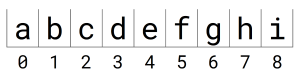
Think of each value a sitting in its own box:

Each of these boxes is given an index number. Maybe somewhat counterintuitively the index numbering typically starts at 0 not at 1.
If you want to remove a value, let’s say f, you end up with an empty box at index 5:
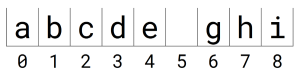
To “close” the gap you would need to move all succeeding letters by one box to the left, which also means the values would change index number (e.g. take g out of the box at index 6 and put it into the box at index 5 etc.). That can be very expensive operation to do.
Conversely, if you want to add a value between c and d you would need to move all values one box to the right and then add the new value to the box at index 3. What would happen to i though? Some array implementation will allow you to add another box at the end (i.e. the length of the array is variable), but others don’t (i.e. the length of the array is fixed, once you created an array with 9 boxes, 9 boxes is the maximum it can contain). In that case, by adding a values between c and d you will have more values than boxes and get an error.
The data type of the values in the array must be the same in some implementations; other allow you to have values of different data types.
Typically arrays are represented by putting a comma between the values and enclosing the lot in square brackets, e.g.
["a", "b", "c", "d", "e", "f", "g", "h", "i"] for the example above. All values in this array are strings.
[1, 5, 8, 10, 15, 67, 34] is an example of an array of integers. This example also shows that values do not need to be in numerical or alphabetical order; the order is determined by the index of their box not the values themselves.
["Susi", "Fran", 15, 2.5, "Joe", -10, true] is an example of an array with values of different data types. This is only possible if the concrete array implementation allows this.
Finally, the value in a box can be an array itself:
[["a", "b", "c"], [1, 4, 3], [["left, "right"], ["top", "bottom"]]]
The example here is a one-dimensional array. Implementations for multi-dimensional arrays do also exist. In a two-dimensional array you need the index numbers of both dimensions to select at box and its value or assign the box a value. Think of a large egg tray: to locate a specific egg you need to know both its position length-wise (x-axis) and depth-wise (y-axis). In three-dimensional arrays you stack egg boxes on top of each other and now, to locate the egg you need three index values: length-wise (x-axis), depth-wise (y-axis) and height-wise (z-axis).
List or linked lists
A linked list linear collection of nodes. A node is the actual value plus a pointer to the next node.
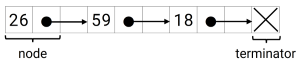
If you want to remove a node from the list there is no need to move other nodes around as well, just the pointer needs adjustment so it will point to another node:

Inserting another node works the same: modify the pointer of the preceding node to point to the new one and the pointer of the new node to the next one.
There are also lists with pointers to both the next and the previous node; the are called doubly linked list.
Hash Map
In hash maps keys are mapped to values. It is a collection of those key-value-pairs. The mapping is done via a so-called hash function.
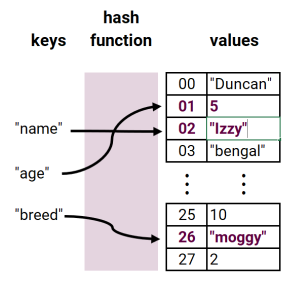
In some implementations keys must be strings, others allow a wider range of data types to serve as keys.
Like in arrays the value of key-value-pair can itself be another hash map.
The most common representations of key value pairs separate the key and the value by = or : . E.g. the above could be represented as:
name=Izzy
age=5
breed=moggy
Or
"name" : "Izzy"
"age": 5
"breed": "moggy"
Annotated bibliography and further reading
BBC Bitesize has some very gentle introductions to data types and structures that cover strings, integers, floats, doubles, Booleans and arrays:
-
‘Implementation: Data types and structures’ (no date) BBC Bitesize. Available at: https://www.bbc.co.uk/bitesize/guides/zghbgk7 [Accessed: 24 May 2026]
-
‘Data types, structures and operators’ (no date) BBC Bitesize. Available at: https://www.bbc.co.uk/bitesize/guides/z788jty [Accessed: 24 May 2026]
The “Data types”, “Arrays” and “Using operators” chapters are of interest for the topic. The other chapters are specifically geared towards VBA (Visual Basic) programming in Excel.
Discussions of data types and structures are usually specific to a programming language or application.
Wikipedia articles on the various data types and structures are quite good at conveying both the basics and going into some detail for specific languages. Some of the detail is very deep though. The articles concerning the data types we discussed are:
-
‘Array (data structure)’ (2026) Wikipedia. Available at: https://en.wikipedia.org/wiki/Array_(data_structure) [Accessed: 24 May 2026]
-
‘Array (data type)’ (2026) Wikipedia. Available at: https://en.wikipedia.org/wiki/Array_(data_type) [Accessed: 24 May 2026]
-
‘Boolean data type’ (2026) Wikipedia. Available at: https://en.wikipedia.org/wiki/Boolean_data_type [Accessed: 24 May 2026]
-
‘Data structure’ (2026) Wikipedia. Available at: https://en.wikipedia.org/wiki/Data_structure [Accessed: 24 May 2026]
This article has links to articles to other data structure mentioned but not discussed.
-
‘Data type’ (2026) Wikipedia. Available at: https://en.wikipedia.org/wiki/Data_type [Accessed: 24 May 2026]
-
‘Hash table’ (2026) Wikipedia. Available at: https://en.wikipedia.org/wiki/Hash_table [Accessed: 24 May 2026]
-
‘Integer’ (2026) Wikipedia. Available at: https://en.wikipedia.org/wiki/Integer [Accessed: 24 May 2026]
-
‘Integer (computer science)’ (2026) Wikipedia. Available at: https://en.wikipedia.org/wiki/Integer_(computer_science) [Accessed: 24 May 2026]
-
‘Linked list’ (2026) Wikipedia. Available at: https://en.wikipedia.org/wiki/Linked_list [Accessed: 24 May 2026]
-
‘List (abstract data type)’ (2026) Wikipedia. Available at: https://en.wikipedia.org/wiki/List_(abstract_data_type) [Accessed: 24 May 2026]
-
‘Primitive data type’ (2026) Wikipedia. Available at: https://en.wikipedia.org/wiki/Primitive_data_type [Accessed: 24 May 2026]
-
‘String (computer science)’ (2026) Wikipedia. Available at: https://en.wikipedia.org/wiki/String_(computer_science) [Accessed: 24 May 2026]
Finally, I found this article by Andrii Chornyi really useful to understand the difference between float and double:
- Chornyi, Andrii (2024) ‘Float vs Double: a comprehensive guide’, Codefinity blog, August. Available at: https://codefinity.com/blog/Float-vs-Double [Accessed: 24 May 2026]
-
A collection of a fixed number of values in a fixed sequence. ↩
-
A collection of values using the “last in first out” (LIFO) principle, i.e. values are added and removed at the same end. Imagine a stack of plates. Typically you would put the next plate on top and, if you need a plate, also take it from the top rather than pull the bottom one out. ↩
-
A collection of values using the “first in first out” (FIFO) principle, i.e. values are added and removed at opposite ends. Just like in a (regularly functioning) queue e.g. for the bus, the first in the queue gets on the bus first, the last in the queue last. ↩
-
A collection of pairs of nodes. This is what Linked Data is based on. ↩
-
A hierarchical structure; think organisational hierarchy diagrams or nested folder structures to visualise this. ↩